



Menu

  • Latest
  • Trending

Categories

  • Beat making
  • Interview
  • Lecture/ Seminar
  • Music industry / Marketing
  • Uncategorized
  • Software & Hardware
  • Soundbank Preview
  • Studio session
  • Tutorial

Random Producers

avatar for Boi-1daBoi-1da
avatar for SoleternitySoleternity
avatar for The PresidentzThe Presidentz
avatar for OG ParkerOG Parker
avatar for Big KoreyBig Korey
avatar for TimbalandTimbaland
Beat Making Videos
  • Home
  • Videos
  • Producers
  • Articles
No Result
View All Result
  • Login
  • Register
Submit video
Beat Making Videos
No Result
View All Result
Home Video Tutorial

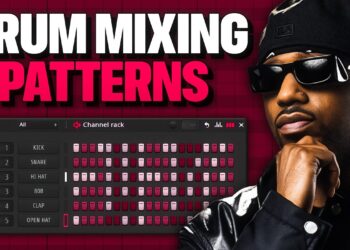
HOW TO USE A PROJECT TEMPLATE ON FL STUDIO | MAKE BEATS FASTER IN FL STUDIO

363 Views
5 years ago
0
0
Share
Facebook Twitter E-mail
    JBeats JBeats
    Share on FacebookShare on TwitterSend via Whatsapp

    I’m showing you guys how to use project templates and also how to install them as your default load project.

    This is for anybody looking to SAVE TIME making beats. It’s also for those who feel like their projects are disorganized. This level of organization and guidance will increase your workflow tremendously! I’ve even added some EQ, stereo spread, panning, and more mixing elements to the tracks to start off your mixing job.

    If you enjoyed this video leave a thumbs up!

    Created by @whoisjbeats

    Get my official template – https://bit.ly/3Cwbl12

    Official Kit Store – https://bit.ly/3hSt4HO

    Subscribe & leave a comment if you enjoyed this video.

    Follow me on Instagram: http://bit.ly/2TW5W0E
    Follow me on Twitter http://bit.ly/30UGQkd
    Follow me on TikTok – https://bit.ly/3jTKFl2

    Follow Sue – https://www.instagram.com/jefesue_/

    Official Store – Soundkits, Templates, Merch, & More – https://bit.ly/3hSt4HO

    Visit my official website – https://bit.ly/3hSt4HO

    Visit my linktree – http://bit.ly/2DBAMlQ

    Learn to be a better producer (1on1 Producer Relationship) – https://bit.ly/3nTuOCo
    Category: Tutorial
    Tags: custom templateFl studiofl studio 20 templatefl studio 20 tutorialFL Studio Templatefl studio template tutorialFL Studio Tutorialfree beatsHow To Make A Beathow to make a templatehow to make a template in fl studio 20how to make fl studio templatehow to use flstudiomaking a template in fl studionew flstudioohgoshprod whoisjbeatsproducergrindproductiontemplate fl studiotemplate in fl studioTutorial for beatswhoisjbeats
    JBeats

    JBeats

    Produced for: Mango Foo + Remy Boy Monty + Peewee Longway + Fat Trel + Soulja Boy + Lil Twist http://whoisjbeats.com/ https://twitter.com/whoisjbeats https://www.instagram.com/whoisjbeats/ https://www.youtube.com/channel/UCeWw6qmD4diYeXYAdmqeyeQ

    Related Posts

    Write a chord progression in Ableton Live | Beginner Series Ep. 2
    Tutorial

    Write a chord progression in Ableton Live | Beginner Series Ep. 2

    October 12, 2026
    0
    How To Make Classic RNB Beats That Sound Timeless
    Tutorial

    How To Make Classic RNB Beats That Sound Timeless

    October 11, 2026
    0
    Build a bassline in Ableton Live | Beginner Series Ep. 3
    Tutorial

    Build a bassline in Ableton Live | Beginner Series Ep. 3

    October 10, 2026
    3
    The Anime Method: How to make better underground melodies
    Tutorial

    The Anime Method: How to make better underground melodies

    October 9, 2026
    4
    Most Producers Don’t Understand BOUNCE (You’re Overcomplicating it)
    Tutorial

    Most Producers Don’t Understand BOUNCE (You’re Overcomplicating it)

    October 8, 2026
    2
    Turn your loop into a track in Ableton Live | Beginner Series Ep. 5
    Tutorial

    Turn your loop into a track in Ableton Live | Beginner Series Ep. 5

    October 8, 2026
    4
    Next Post
    Bring Your Kid To Work Day: Music Producer Edition

    Bring Your Kid To Work Day: Music Producer Edition

    KLC: E40’s Uncle Gave Master P The Indie Game And We Took It From The Bay To New Orleans

    KLC: E40's Uncle Gave Master P The Indie Game And We Took It From The Bay To New Orleans

    Buddah Bless: Placement Strategies, How to Get Paid First! Free Beats? Sampling Problems, Branding

    Buddah Bless: Placement Strategies, How to Get Paid First! Free Beats? Sampling Problems, Branding

    Leave a Reply Cancel reply

    Your email address will not be published. Required fields are marked *


    This Analog Effect Plugin Is Absolutely INSANE

    This Analog Effect Plugin Is Absolutely INSANE

    1 Views
    October 11, 2026
    How To Make Beats Like Justin Bieber’s SWAG Album

    How To Make Beats Like Justin Bieber’s SWAG Album

    1 Views
    October 11, 2026
    Mod-FX Plugin Launch Party! – Making Beats & Chilling 🎹

    Mod-FX Plugin Launch Party! – Making Beats & Chilling 🎹

    0 Views
    October 11, 2026
    Beat Making Videos

    © 2022 Beat Making Videos

    Navigate Site

    • Articles
    • Videos
    • Producers
    • Privacy Policy

    Follow Us

    Welcome Back!

    Login to your account below

    Forgotten Password? Sign Up

    Create New Account!

    Fill the forms below to register

    *By registering into our website, you agree to the Terms & Conditions and Privacy Policy.
    All fields are required. Log In

    Retrieve your password

    Please enter your username or email address to reset your password.

    Log In

    Add New Playlist

    No Result
    View All Result
    • Home
    • Videos
      • Beat making
      • Interview
      • Lecture/ Seminar
      • Music industry / Marketing
      • Uncategorized
      • Software & Hardware
      • Soundbank Preview
      • Studio session
      • Tutorial
    • Producers
    • Articles

    © 2022 Beat Making Videos

    This website uses cookies. By continuing to use this website you are giving consent to cookies being used. Visit our Privacy and Cookie Policy.